NativeRest is designed with a strict offline-first architecture. Because we never force you to synchronize your sensitive API keys or proprietary endpoints to a third-party cloud, exporting your data is the primary way to back up your work, collaborate with your team, and migrate between machines.
Our powerful export engine ensures that your complex folder structures, scripts, and variables are perfectly preserved and easily shareable.
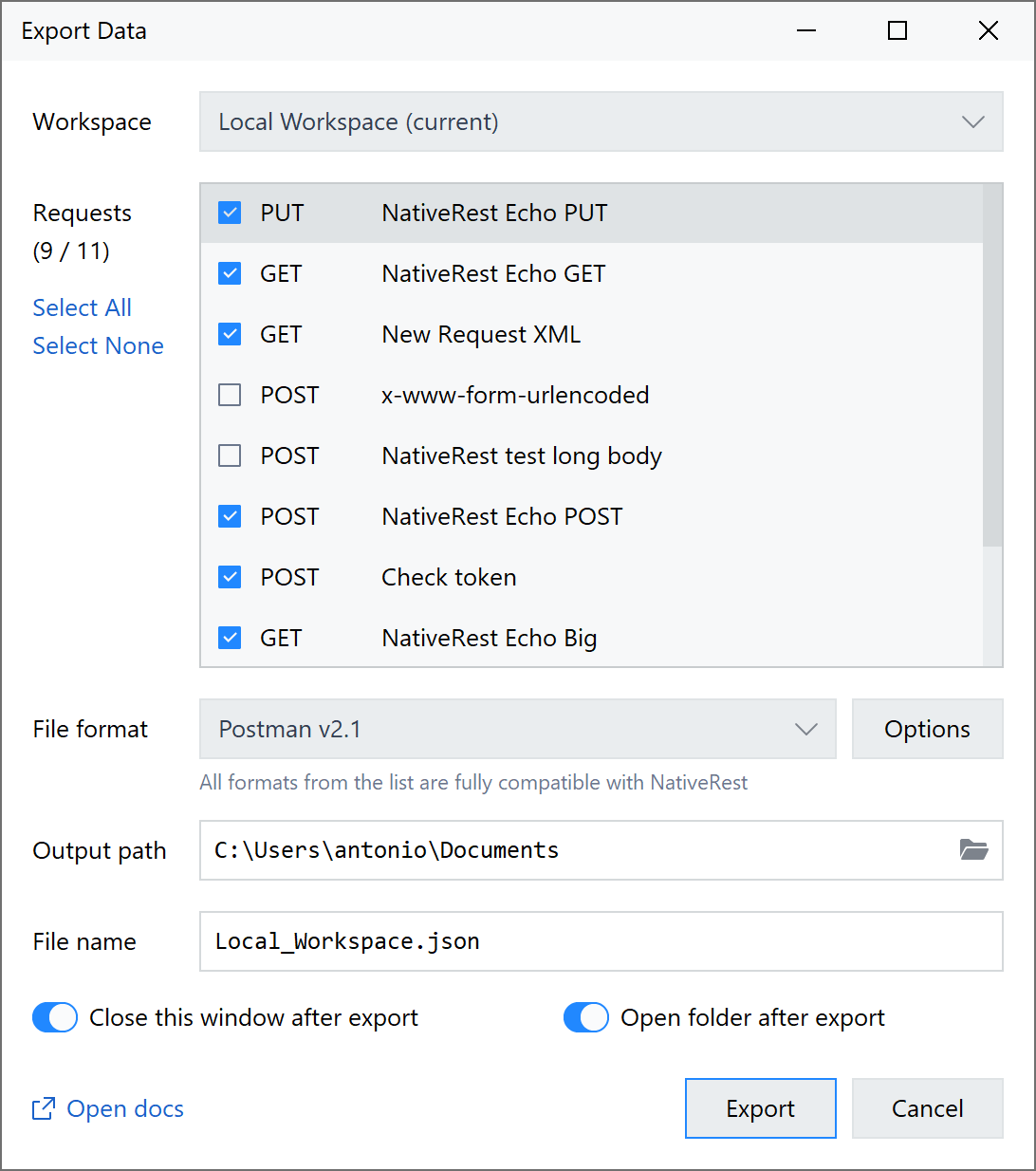
NativeRest supports export into Postman, Insomnia and HAR file formats.
All formats are fully compatible with NativeRest.
1. Structural Workspace Export (Sharing with Your Team)
Whether you need to share an entire API project with a new developer or just a specific set of endpoints with the QA team, NativeRest allows you to export exactly what you need.
Exporting an Entire Workspace
This option creates a complete backup of your current workspace, including all collections, folders, requests, variables, and tests.
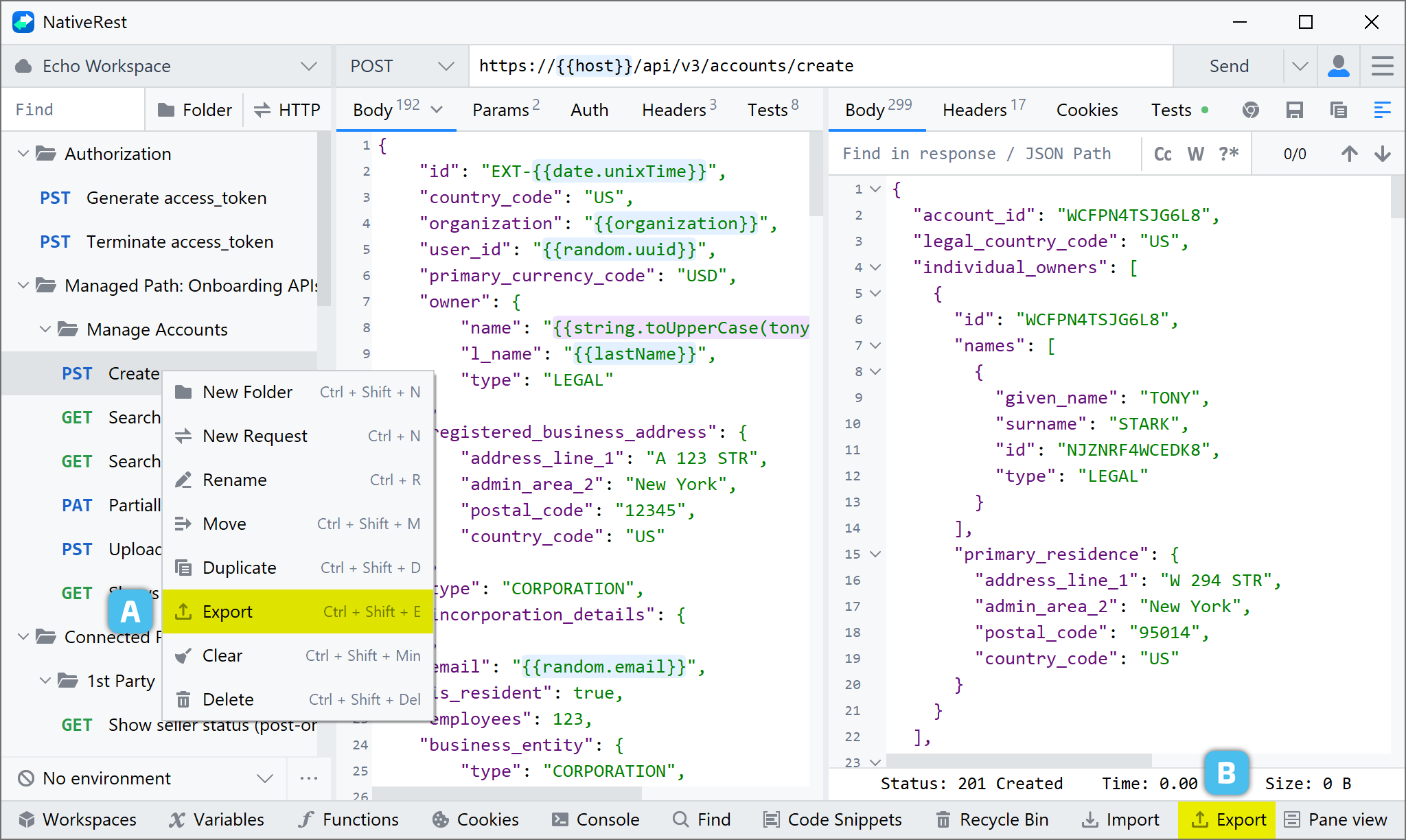
To export your data from NativeRest, select Export in the bottom bar or use shortcut Ctrl + Shift + E.
Exporting Specific Folders (Partial Export)
You don't always want to share everything. NativeRest allows you to export individual nested folders while maintaining their exact internal hierarchy.
- Locate the specific folder in the left-hand sidebar.
- Right-click the folder and select Export.
- The exported file will contain only the requests and sub-folders within that specific branch.
2. Exporting Environments & Variables
Environments (Development, Staging, Production) often contain the base URLs and parameters necessary to run your exported requests. You can export environments separately to share server configurations with your team.
- Open the Variables panel in the bottom bar.
- Select the environment you wish to share.
- Click the Export button.
🛡️ Security Best Practice: Before exporting an environment for team sharing, ensure that you remove or mask any sensitive personal API keys, bearer tokens, or passwords. We recommend using Current Values for local secrets and only exporting Initial Values for team distribution.
3. Generating Code Snippets (Exporting Single Requests)
If you only need to export a single API request to use in your actual application code, you don't need to export a workspace file. NativeRest features a built-in code generator.
- Open the request you want to export.
- Click the Code snippets button in the bottom bar.
- Select your target programming language or framework (e.g., cURL, Python, JavaScript, Go, Java).
- Click Copy to Clipboard and paste the ready-to-use snippet directly into your IDE.
4. Export Formats & Compatibility
NativeRest exports data in a clean, strictly formatted JSON structure (*.json). This ensures that your exported files are:
- Version-Control Friendly: You can safely commit NativeRest export files to your Git repository. Because it is beautifully formatted JSON, you can easily track changes, review pull requests, and maintain a history of your API evolution alongside your codebase.
- Human-Readable: Easily inspect the contents using any standard text editor.
5. Third-Party Export (Postman, Insomnia, & HAR)
NativeRest does not lock you into a proprietary ecosystem. If you need to collaborate with external teams using different tools, or generate traffic logs for debugging, you can easily export your data to industry-standard formats.
- Postman Collection (v2.1): Export your workspaces into the standard Postman format to share with external clients.
- Insomnia: Generate export files fully compatible with the Insomnia REST client.
- HAR (HTTP Archive): Export request and response cycles as HAR files for deep network analysis and debugging in external tools.
To import data back into NativeRest, simply drag and drop the exported file into the application window or click Import button in the bottom bar.
